$20
JG Mechanic Script

$30
- Instant download after checkout
- Download link by email and in My Account
- 24/7 support for installation and setup
- Ongoing updates
- Secure checkout
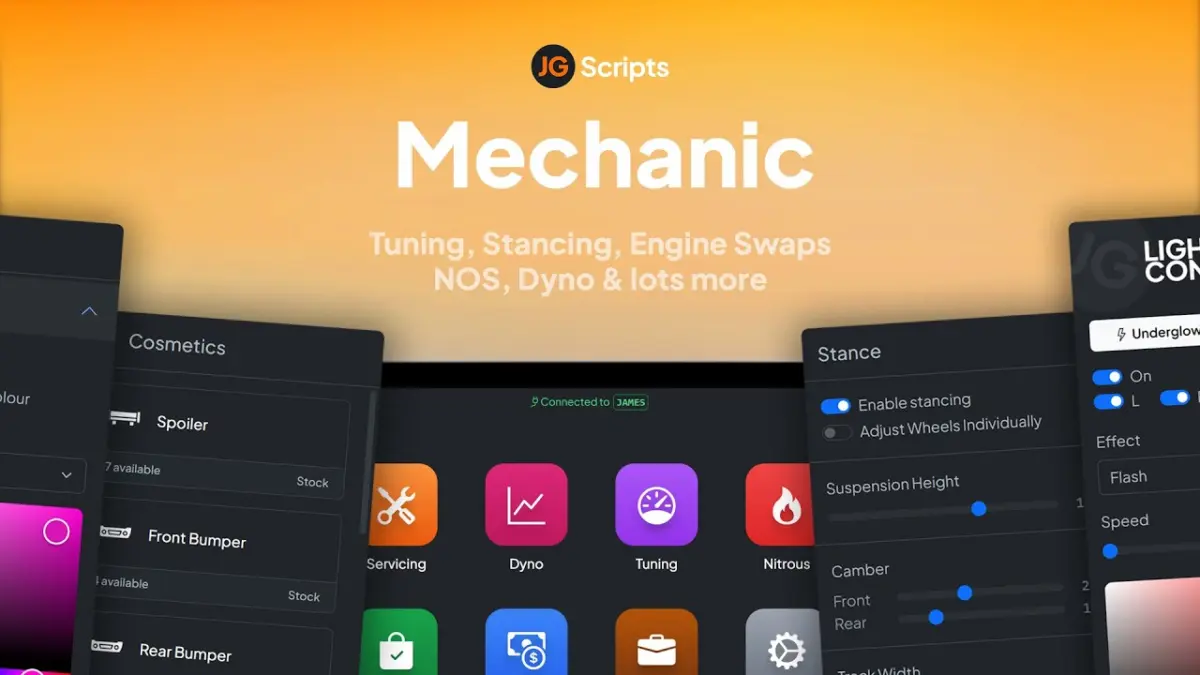
JG Mechanic Script gives mechanics a workshop tablet for servicing vehicles, testing performance, fitting tunes and running their business. The script includes a working car lift, an inventory item for vehicle lighting and the free jg-vehiclemileage resource required for mileage-based servicing.
JG Mechanic Script
Workshop equipment and inventory
Choose how mechanics open the tablet. You can make it an item or give mechanics access by command. They can carry on using it as they move around the shop, without having to stand at a marker. A mechanic can connect the vehicle they want to work on. Business management functions also work with no vehicle connected.
You can place the custom lift prop anywhere on the map. The script automatically locks it to the job for a mechanic business, and mechanics can operate the lift. For lighting, the included JG LightingControl+ inventory item lets players switch RGB xenons and underglow on or off. Its effects include flash and rainbow.
You can configure almost any function to use items from inventory. Parts can have corresponding items, and you can decide which workshop tasks use them. Options include the following.
- Fitting a customer’s tuning order, swapping an engine or installing brakes.
- Using NOS or adjusting a vehicle’s stance.
- Cleaning a vehicle, repairing it or carrying out a service.

Tuning orders and prices
The tuning interface lets players browse every available vehicle modification. That selection covers the latest DLC options, including all 7 new plates from Chop Shop. To change the selection on your server, disable individual options in the config.
You choose how a player gets a modification fitted. With self-service tuning, the player can apply the change and pay for it themselves. You can also let players submit an order so a mechanic can do the installation. Mechanics use the tablet to fulfill those orders.
Players can see what a modification looks like from the automatic preview angles. If they want to inspect it from a particular angle of their own, they can use the free camera.
The respray controls give players several choices for the paint finish.
- Base colour. Players can search the base colours from GTA for the one they want to use on the vehicle.
- Colour sync. Players who want the primary and secondary colours to match can sync the two.
- Pearlescence. Players can use the toggle to turn pearlescence on or off for the respray.
The RGB selector offers millions of colour choices and takes one click to select a colour. Chameleon finishes are another respray option. Players can apply these colours to wheels that support them and to compatible interiors.
Set a separate price for each tuning category. For example, a respray can have its own price independent of wheels, cosmetic changes or performance work. You can configure price multipliers too. To price tuning in proportion to what the vehicle is worth, use values from vehicles.meta, QBShared or JG Dealerships. Repair charges can also be proportional to vehicle value.
Stance, engines and transmissions
Players can access the optimized stance tools from an item or through the tuning menu. Each wheel has its own adjustments for tracking, camber and suspension height. Changes to stance sync server-wide. The script saves these settings both when a vehicle goes into garage storage and when someone takes it back out.
Mechanics can use the tablet for performance work beyond the options GTA provides as stock. The preconfigured swaps cover I4, V6, V8 and V12 engines, with engine sounds included for each of those types. The script also comes with tuning options already set up for tyres, brakes and the drivetrain.
To add a custom performance option, define it in the config. You control what that tune does to vehicle handling and how it changes the sound. You can use your own streamed engine sounds as well.
A mechanic can use the tablet to convert an automatic vehicle to a manual, except on electric vehicles. The swap can use society money or an item. With a manual gearbox, shifting becomes part of the skill of driving in the city. A driver who shifts well can get more performance out of the engine. Leaving a shift too late damages the engine and means the driver will need a mechanic sooner. Watch the manual transmission in use.
Repairs, inspections and dyno tests
Repair settings determine what players can do about damage. You can let them fix their own vehicles at a tuning location or place an order for a repair. Other options let players use a repair kit or make a quick repair with duct tape.
Servicing accounts for wear separately from damage caused by a crash. As mileage increases, vehicle parts wear down. In the settings, choose the distance a vehicle can travel between required inspections by a mechanic. At inspection, worn parts may need replacing for the vehicle to keep performing at its full capacity.
To test how a customer’s vehicle currently performs, a mechanic can run a dyno test from the tablet. A run takes about 30 seconds. The mechanic can see the horsepower and torque figures as the vehicle moves through its rev range. When the vehicle reaches maximum performance, the dyno displays its statistics and a final graph. The mechanic can share that graph with the customer or with others nearby.
Billing and business records
Installing a tune, fitting NOS and servicing a vehicle each generate an invoice automatically. The invoice keeps a record of what changed on that vehicle. The mechanic enters the amounts to charge and can edit the invoice before sending it to the customer.
Mechanics can also start with a blank invoice on the tablet. They can save an invoice for later or send it to the customer again. Invoices stay in sync for everyone employed by the same mechanic business. A mechanic can open the tablet to manage those invoices even without a vehicle connected.
For administration and logging, you can connect mechanic operations to Discord using webhooks. Configure up to 7 separate webhook URLs. The webhooks can send notifications when important events occur.
Client sync and resource use
Where possible, the script uses OneSync Infinity state bags to sync effects and animations for all players nearby. Using state bags for client sync avoids running unnecessary infinite while loops. Resource use stays low on large servers too.
Reported resmon usage ranges from 0.0 to 0.1 ms except when heavy effects are active on the client. Examples of those effects include stancing, NOS and LightingControl+.
Categories: FiveM Jobs Scripts | Best Job Packs for FiveM Servers 2026, ESX Scripts, Qbox Scripts, QBCore Scripts
Common questions
How do I get my files after I pay?
Your download link arrives by email as soon as checkout finishes. You can also log in to My Account with the email you ordered with and open Downloads. That is also where you find anything you bought before.
Can I get a refund?
Sales are final once a product has been downloaded. If you picked the wrong item and haven't downloaded it yet, contact support and we will swap it for the right one at no charge.
Can I share or resell a script?
No. Your license covers personal use with the account that made the purchase. Reselling, sharing or uploading the files to public sites ends every license on that account.
Do products get updates and support?
Yes. Every product comes with ongoing support and updates. Support for very old versions, or setups running outdated dependencies, can end over time.
You might also like
-
-
-61%
Original price was: $90.$35Current price is: $35.
-
-40%
Original price was: $50.$30Current price is: $30.
-
-
-69%
Original price was: $80.$25Current price is: $25.