Metal Detector
5.0$20
FREE!
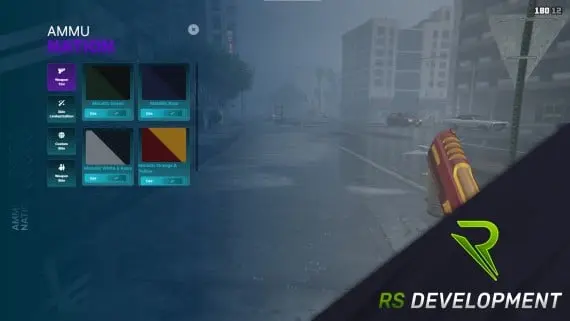
FREE Weapon Skin Menu gives players weapon tints and skins in a free, standalone script. It adapts to the server’s framework automatically.
Use the configuration file to add patterns or edit the translation. You can also use it to add weapons and GTA Online skins from future updates.
Every player sees the same applied tint or GTA Online skin. Classic weapons come with 8 color tints, and every mk2 weapon has 32. The menu includes all GTA Online skins for various weapons.
You can add images of your own and share them with players, or add images from the web, including animated ones. Custom images and web images display only on the client because the Fivem native cannot sync them.
Categories: Tebex FREE Scripts, ESX Scripts, Qbox Scripts, QBCore Scripts, RS-Dev
Your download link arrives by email as soon as checkout finishes. You can also log in to My Account with the email you ordered with and open Downloads. That is also where you find anything you bought before.
Sales are final once a product has been downloaded. If you picked the wrong item and haven't downloaded it yet, contact support and we will swap it for the right one at no charge.
No. Your license covers personal use with the account that made the purchase. Reselling, sharing or uploading the files to public sites ends every license on that account.
Yes. Every product comes with ongoing support and updates. Support for very old versions, or setups running outdated dependencies, can end over time.
$20
FREE!
FREE!
FREE!
FREE!