FREE Admin Menu
FREE!
- Instant download after checkout
- Download link by email and in My Account
- 24/7 support for installation and setup
- Ongoing updates
- Secure checkout
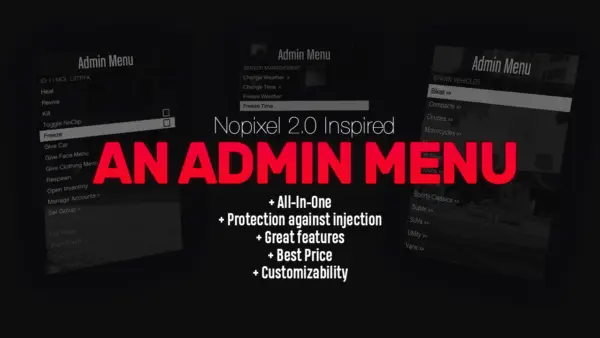
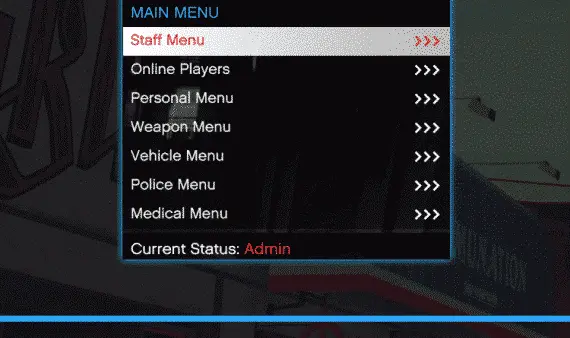
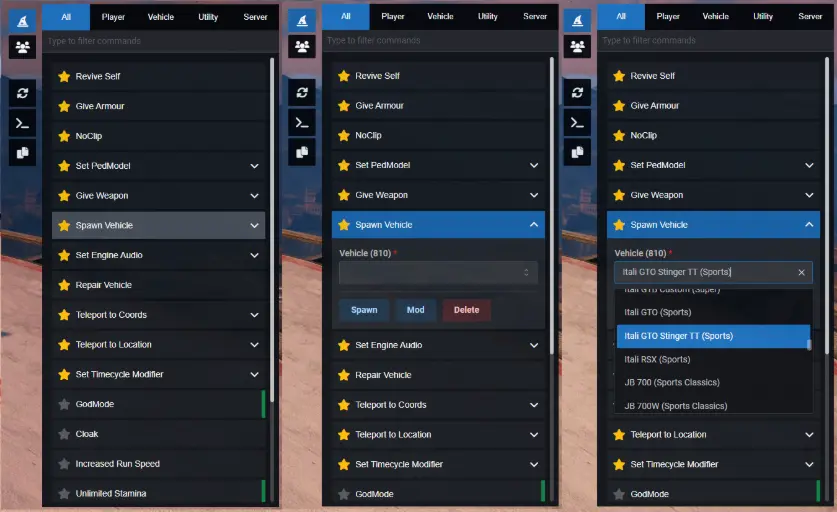
This free admin menu gives FiveM servers a pre-built NUI for running the admin commands they already have. JSON files control the commands. The download includes teleports, godmode and noclip.
FREE Admin Menu
Resource files and startup
Dependencies
| Resource | Required | Purpose |
|---|---|---|
| ox_lib | Yes | Callbacks, notifications, dialogs, vehicle properties, clipboard |
| oxmysql | Yes | Server script dependency |
| qb-core | No | Unlocks QBCore player data, jobs, gangs, items, and extra commands |
Installation
Put ag-menu in the resources folder. In server.cfg, add ensure ag-menu so that both oxmysql and ox_lib start first. The server uses Lua and oxmysql, with QBCore optional. The client uses ox_lib and Lua 5.4.
Tech stack
The compiled interface is in web/build/. Its stack includes TypeScript, React 18, Mantine 7, Vite, Jotai, react-hook-form and Font Awesome. The version in web/package.json is 2.0.0. If you edit the React source, run both commands inside web/, in this order.
npm installnpm run build
Grant staff ACE access to the commands they should use. See the permissions section on this page.
Permissions
Set ACE principals in the server config so only staff can open and use the menu. To run a menu command, the resource checks the command ACE with ox_lib:checkPlayerAce. Each registered command checks command.<commandName> using restricted ACE checks. Both giveweapon and pedmodel require group.admin on the server.
Command and sidebar configuration
Configuration
In shared/commands.json, set the entry text with label, the command with command and its category with filter. Set type to button or form. Optional fields include fav, args, close and active. Use the optional buttons field to change the execute label or add extra action buttons.
This file also sets form argument types. Select fields can depend on earlier selections. For example, selecting a job can load its grades through setOptions and a NUI callback.
| Type | Description |
|---|---|
input |
Text field |
number |
Numeric input with min/max/step |
select |
Searchable dropdown (static options, optionsKey, or live getOptions) |
multi-select |
Multiple selection |
checkbox |
Boolean toggle |
slider |
Range slider |
autocomplete |
Typeahead from a fixed list |
At runtime the resource reads shared/*.json for the UI’s autocomplete and select fields. You can adapt the data to your server by editing the JSON alone.
| File | Contents |
|---|---|
vehicles.json |
Vehicle spawn names (~3000) |
weapons.json |
Weapon hashes |
pedmodels.json |
Ped model names (~800) |
teleports.json |
Named locations with coords and inside / outside type |
timecycles.json |
Timecycle modifier names (~700) |
weather.json |
Weather types (loaded for custom commands; not used by default menu) |
items.json |
Inventory items (~225) |
jobs.json |
Job names |
gangs.json |
Gang names |
The icon sidebar has shortcuts for copying coordinates, reloading favorites and dev mode. In shared/quickactions.json, set command to the shortcut command and icon to a Font Awesome class. Choose button or menu for type. A menu opens its submenu on hover. Optional fields include items for submenu entries, plus close and active.
| Action | Icon | Description |
|---|---|---|
| Reload commands | fa-sync-alt |
Clears saved favorites (commands-r) after confirmation |
| Dev mode | fa-terminal |
Toggles dev mode (dev); highlights when active; fires hud:client:toggleDev |
| Copy coords | fa-copy |
Submenu: copy vector3 or vector4 to clipboard |
| Logout | fa-sign-out-alt |
QBCore only — runs logout and closes the menu |
Staff controls
Opening the menu
| Method | Details |
|---|---|
| Keybind | U (default) — Open Admin Menu |
| Command | /admin |
| Event | TriggerEvent("admin:toggleMenu", true) or false to close |
Use the opening methods again to toggle the menu off, or close it through the NUI close callback.
User interface
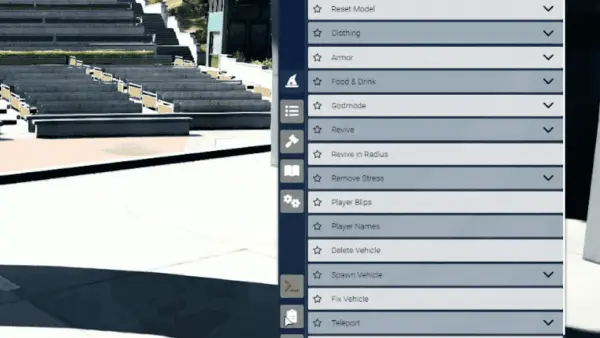
The Commands tab groups every admin action. Search by label or choose a filter from All, Vehicle, Player, Server, Utility and User. Star any command to mark it as a favorite. Resource KVP stores the order locally under favorites.
One click executes a Button command. A Form command expands a panel and validates its fields before it runs. With active: true, enabled commands such as godmode and noclip appear green. With close: true, commands such as noclip close the menu once they run.
Player records and QBCore
Opening the menu makes the client refresh the Players tab. Its live roster shows each online player’s display name, server ID and live ped headshot texture. Each player’s Ban, Kick, Kill and Revive buttons pass that player’s ID to the matching server command.
QBCore integration
Without QBCore, Targets and Players list only names and server IDs. When qb-core runs, init.lua detects it and adds any extra QBCore commands missing from commands.json. Targets and Players then include citizen ID, character information, money, gang and job.
Only QBCore supports expanding a player’s record. It shows the full name, the job and its grade, the gang and its grade, and formatted amounts for both cash and bank. QBCore also adds the Logout shortcut.
- Jobs options use
shared/jobs.json. TheJobGradesNUI callback supplies the dynamic job grade dropdown. - Gangs options use
gangs.json. TheGangGradesNUI callback supplies the dynamic gang grade dropdown. - Items options use
items.json.
Events & exports
| Name | Side | Description |
|---|---|---|
admin:toggleMenu |
Client | (boolean) open/close menu |
admin:server:RemoveStress |
Server | QBCore stress reset |
admin:server:RelieveNeeds |
Server | QBCore hunger/thirst reset |
ag:setPedModel |
Client | Apply ped model from server |
Resource callbacks include ag:getPlayers, ag:GetPedheadshotTxdString and ag:getTargets.
Built-in and external commands
Built-in commands
Built-in commands come from client/commands.lua or server registration. Their menu entries come from shared/commands.json. External commands run via ExecuteCommand, so commands such as car, fix, ban, kick and revive must already exist on the server.
| Command | Type | Description |
|---|---|---|
| Revive Self | Button | Runs revive (framework/admin resource) |
| Give Armour | Button | Sets ped armour to 100 |
| Remove Stress | Button | QBCore — sets player stress metadata to 0 |
| Relieve Needs | Button | QBCore — sets hunger and thirst to 100 |
| Set PedModel | Form | Change ped model (self or target); 800+ models in pedmodels.json |
| Give Weapon | Form | Give weapon + ammo to self or target |
| Give Money | Form | QBCore — cash or bank to a target |
| Set Job | Form | QBCore — target, job, and grade (grades load dynamically) |
| Set Gang | Form | QBCore — target, gang, and grade |
| Give Item | Form | QBCore — target, item, and amount |
| Command | Type | Description |
|---|---|---|
| Spawn Vehicle | Form | Spawn from 3000+ vehicles in vehicles.json; extra buttons Mod and Delete (dv) |
| Set Engine Audio | Form | ForceVehicleEngineAudio using another vehicle model; Reset extra button |
| Repair Vehicle | Button | Runs fix (external command) |
| Teleport to Vehicle | — | tpv — warp into driver seat of current vehicle |
Mod (mod) uses vehicle properties from ox_lib to apply custom wheels, tint, xenon, turbo and maximum performance mods.
| Command | Type | Description |
|---|---|---|
| GodMode | Toggle | Player invincibility |
| NoClip | Toggle | Freecam flight; closes menu; see NoClip / Freecam |
| Cloak | Toggle | Makes ped invisible |
| Increased Run Speed | Toggle | 1.49× run and swim multiplier |
| Unlimited Stamina | Toggle | Continuous stamina restore |
| Superjump | Toggle | Super jump every frame |
| Night Vision | Toggle | Night vision overlay |
| Thermal Vision | Toggle | Thermal/seethrough overlay |
| Teleport to Marker | Button | Runs tpm |
| Teleport to Coords | Form | tpc x y z — optional keep vehicle |
| Teleport to Location | Form | tpl from 80+ preset locations in teleports.json; optional keep vehicle |
| Set Timecycle Modifier | Form | 700+ modifiers in timecycles.json with strength slider; Clear resets to default |
| Dev | Toggle | Toggles dev HUD via hud:client:toggleDev |
| Command | Type | Description |
|---|---|---|
| Kick Player | Form | Target + reason |
| Kick All | Button | Runs kick with no args (server-wide) |
| Ban Player | Form | Target, reason, and ban length |
| Command | Description |
|---|---|
pedmodel [model] [target?] |
Change ped model (ACE: group.admin) |
giveweapon [weapon] [ammo?] [target?] |
Give weapon to ped (ACE: group.admin) |
The default menu omits some client-only helpers. Stopping the resource automatically resets vision, timecycle, visibility, speed and godmode.
| Command | Description |
|---|---|
copycoords vec3 / vec4 |
Copy position (and heading for vec4) to clipboard |
commands-r |
Reset favorite commands (with ox_lib confirm dialog) |
tpc |
Teleport to raw coordinates |
tpl |
Teleport to named location from JSON |
tpv |
Warp into vehicle driver seat |
timecycle |
Apply or clear timecycle modifier |
engineaudio |
Change or reset vehicle engine sound |
NoClip flight controls
NoClip / Freecam
NoClip runs the embedded freecam in client/freecam/. The ped’s position follows the camera, as does the vehicle’s position when the player is driving. On-screen instructional buttons show the controls. Freecam supports gamepad mappings as well as keyboard controls.
- Use WASD-style controls to fly. Use the mouse to look around, with a right-click for mouse look while the menu is open.
- Scroll to adjust flight speed. Shift speeds up movement and Alt slows it down.
Categories: Tebex FREE Scripts, Qbox Scripts, QBCore Scripts
Common questions
How do I get my files after I pay?
Your download link arrives by email as soon as checkout finishes. You can also log in to My Account with the email you ordered with and open Downloads. That is also where you find anything you bought before.
Can I get a refund?
Sales are final once a product has been downloaded. If you picked the wrong item and haven't downloaded it yet, contact support and we will swap it for the right one at no charge.
Can I share or resell a script?
No. Your license covers personal use with the account that made the purchase. Reselling, sharing or uploading the files to public sites ends every license on that account.
Do products get updates and support?
Yes. Every product comes with ongoing support and updates. Support for very old versions, or setups running outdated dependencies, can end over time.
You might also like
-
-
-54%
Original price was: $65.$30Current price is: $30.
-
FREE!
-
FREE!
-
FREE!